Binders: json

If you are looking for a quick way to assign JSON data to your WordPress page or post, the {{JSON..}} binder is the way to go. This binder allows you to define an arbitrary data source that can be bounded to you page and utilizes when rendering your page.

Motivation

While building your page template, you may want to link your design to dynamic data that you might not have at the time that you are writing the code. The {{JSON.. }} binder acts as temporary data source that later on be replaced with the dynamic data that you truly want to use.


Parameters

source

(string) (required*) The name of the internal JSON source file.
Default: none

assign_to

(string) (required*) The name of the object to which you wish to bind the data output.
Default: none


Return

This binder returns the JSON string as an object.


Basic Usage

{{json assign_to="my_info"}}
    {"name": "Raul", "role": "CEO", "favorite_number": 60}
{{/json}}

<div>
    <h1>{{$my_info.name}}, <i>{{$my_info.role}}</i></h1>
    <small>{{$my_info.favorite_number}}</small>	
</div>

Examples

Consider a scenario where you wish to show a list of  “Projects“. You may choose to  create a custom post type in WordPress to manage your projects, or you might prefer to create a post category to achieve the same results. Thank to the {{JSON.. }} binder you can build your template with temporary data, and later on assign the data source that fits your needs.

{{json assign_to="projects"}}
{
    "data": [
        {"name": "Logo Design", "client": "ACME, LLC"},
        {"name": "Landing Page", "client": "Non Profit Organization"},
        {"name": "Analytics Integration", "client": "Internal"}
    ]
}
{{/json}}

<ul>
{{foreach $projects.data as $single_project}}
    <li>
        <h2>{{$single_project.name}}</h2>
        <p>{{$single_project.client}}</p>
    </li>
{{/foreach}}
</ul>


Later on, once you determine what is the best way to manage your projects in WordPress, you can replace the {{JSON… }} binder with a different one that uses dynamic data:

{{posts show="category" name="my-projects-category-slug" assign_to="projects"}}

<ul>
{{foreach $projects.data as $single_project}}
    <li>
        <h2>{{$single_project.name}}</h2>
        <p>{{$single_project.client}}</p>
    </li>
{{/foreach}}
</ul>


Using An Internal JSON File

You can also use internal JSON files to model your project. An internal JSON file is a predefined JSON file that can be include into your project, so you do not have to create content in WordPress while building your pages.

{{json source="me" assign_to="profile"}}{{/json}}
<!-- see: http://builder.simplifysites.com/resources/data/me.js -->

<div>
	<h1>{{$profile.first_name}} {{$profile.last_name}}</h1>
	<p>{{$profile.website}}<br/>
	   {{$profile.twitter}}</p>	
</div>


Binders: require

The {{require.. }} binder allows you to includes a required Javascript or CSS file in your page template. This binder is similar to the WordPress wp_enqueue. Anywhere in your template code you can add the {{required… }} binder to indicate that your code requires a CSS or Javascript code that is hosted in a separate file. The binder will add your code URL to a queue and once you specify so, the {{require… }} binder will output all URLs in the queue with appropriate SCRIPT or LINK tags.

Motivation

Image that you are building page block that renders an image slider. You image slider may require to use a third party library the might be hosted in the cloud (e.g. Nivo Slider, FlexSlider, etc). Although you could simple add the required remote libraries to the main HTML code of your page, if you need to copy your “slider block” to a different page, you will also have to modify the HTML code of the page where you wish to add the copy of the slider. The {{require… }} binder basically remove the need of tracking CSS or Javascript dependencies that need to be included in the main page.

You can declare your require dependancies anywhere in your blocks and have the CSS or Javascript output before or after the declaration. See the Examples section below.


Parameters

type

(string) (required*) The type of code that you require to include. Valid values for the type parameter are: css, javascript.
Default: none

src

(string) (required*) The URL of the library you wish to include. You must use an full absolute URL (e.g. http://my-project-useranme.appcropolis.com/resources/js/my-script.js). If you would like to point to a file that you uploaded to the resources folder in your project, you can omit the server portion of the URL as long as you start with a forward slash (e.g. /resources/js/my-script.js).
Default: none

cache

TODO

output

(string) Instruct the binder to output the css or javascript code that is in the queue.
Default: none


Return

Outputs the Javascript or CSS that have been added to a queue.


Examples

Consider a page with two blocks. Both blocks require two different stylesheets, but you want both stylesheet to be included in the header section of the HTML page that holds the two blocks. To accomplish this, you can instruct the {{require.. }} binder to output the code in the <head/> section of the page, and further down declare the libraries that you wish to include.


<html>
 <head>
  <title>My Page Template</title>
  {{require type="css" output="true"}} <!-- this will output the two CSS files required below -->
 </head>
 <body>
  <div class="appc-page">
      <div id="block1">
          {{require type="css" src="http://server.com/css/style1.css"}}
          <h2>Block #1</h2>
      </div>
      <div id="block2">
          {{require type="css" src="http://server.com/css/style2.css"}}
          <h2>Block #2</h2>
      </div>
 </body>
</html>


Getting Access To Custom Posts Data

Problem

In WordPress you have created s custom post type to manage special data, and you would like to render the custom post entries in your project.

Solution

You can use the post binder ({{posts…}}) and pass a parameter post_type. The posts binder will allow you to request posts from the database and adding the parameter post_type, followed by the slug of the post type, it will filter out posts that are different than the posts that you wish to request.

Examples

Render a list of custom posts titles

/* assuming you have a custom post type "event" */
{{posts assign_to="my_events" post_type="event"}}
<ul>
    <h2>Events</h2>
    {{foreach $my_events.data as $event}}
    <li>Name: {{$event.post_title}}<br/>
        Description: {{$event.post_content}}<br/>
        <a href="{{$event.post_permalink}}">View Details</a>
    </li>
    {{/foreach}}
</ul>


WordPress Basics. Understanding How To Use Your Website

WordPress is a powerful platform that allows you to create simple and complex websites. Below there is a compilation of videos that will illustrate the basic concepts WordPress and blogging so yo can make the best of you website.

What is WordPress?


How to Create a New Post in WordPress


How to upload images to WordPress


How To Create A Search Form For Your WordPress Blog

Problem

You would like your website visitors to be able to search for content in your website.

Solution

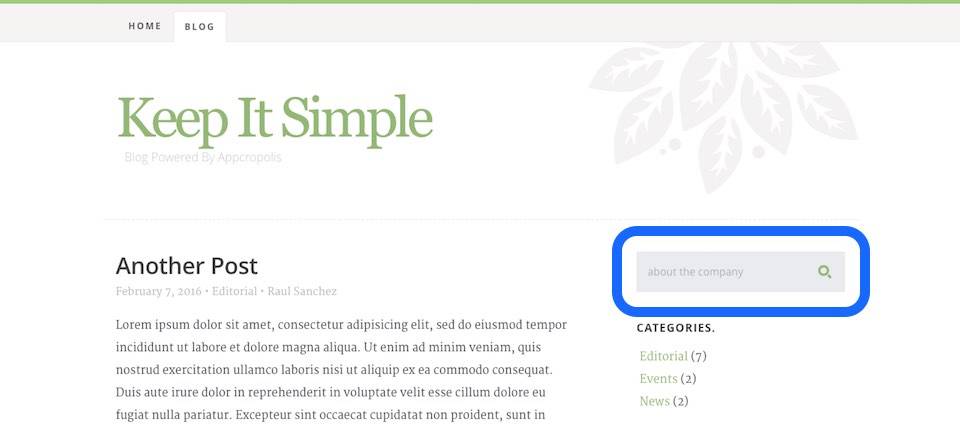
If you are building a blog, you certainly will like to allow your website visitors to search for blog posts. If that is the case you can add a simple form that will allow you visitors to enter a search term and get a list of posts that contains that keyword or term. The code below show how to define a input field with an id and name “s“, which by default is the variable WordPress expect to perform a search operation.

Example

Create a simple form that remembers the last search term

<div class="search-box">
    <h3>Search</h3>
    <form action="/" method="GET">
        <input 
            type="text" 
            id="s" 
            name="s" 
            value="{{if $smarty.get.s}}{{$smarty.get.s}}{{/if}}" 
            placeholder="{{if $smarty.get.s}}{{$smarty.get.s}}{{else}}Search for articles{{/if}}" 
            class="text-search">
        <input type="submit" value="" class="submit-search">
    </form>
</div>


Conclusion

The action of the form is set to the root (“/“), which will assure that the request will be capture by WordPress. Also notices that the value of the search text input field will be “empty” unless the variable “s” is in the page URL. This will allow render the last search term in case the result is empty, the visitor can modify his or her search term without having type the entire term.

Embedding Google Maps

TODO: Embedding Google Maps is as simple as pasting the IFRAME for the map. However, be aware that when scrolling over the page, the IFRAME of the map will capture the mouse scroll event, preventing the page from scrolling.

To overcome this issue, you should use the Maps Javascript API instead. If you choose to use the IFRAME implementation, you can add the code below to overcome the mouser trap issue:


HTML

<section id="content">
	<div class="map" id="overlay">
        <iframe  id="map" src="https://www.google.com/maps/embed?pb=!1m18!1m12!1m3!1d3118.943810333741!2d-90.40780471547198!3d38.581141747979544!2m3!1f0!2f0!3f0!3m2!1i1024!2i768!4f13.1!3m3!1m2!1s0x87d8cc31754abc77%3A0xd633e3938b87c432!2s101+W+Argonne+Dr+%23205%2C+Kirkwood%2C+MO+63122!5e0!3m2!1sen!2sus!4v1458332252466" frameborder="0" style="border:0" allowfullscreen></iframe>
    </div>
</section>


CSS

.scrolloff {
    pointer-events: none;
}


Javascript

$(document).ready(function () {

    $('#map').addClass('scrolloff');                // set the mouse events to none when doc is ready
    
    $('#overlay').on("mouseup",function(){          // lock it when mouse up
        $('#map').addClass('scrolloff'); 
        //somehow the mouseup event doesn't get call...
    });
    $('#overlay').on("mousedown",function(){        // when mouse down, set the mouse events free
        $('#map').removeClass('scrolloff');
    });

    $("#map").mouseleave(function () {              // becuase the mouse up doesn't work... 
        $('#map').addClass('scrolloff');            // set the pointer events to none when mouse leaves the map area
                                                    // or you can do it on some other event
    });
    
});